Original
The dry loop with no effects, for reference.
ALEVRB 1.2.1 · $10, once
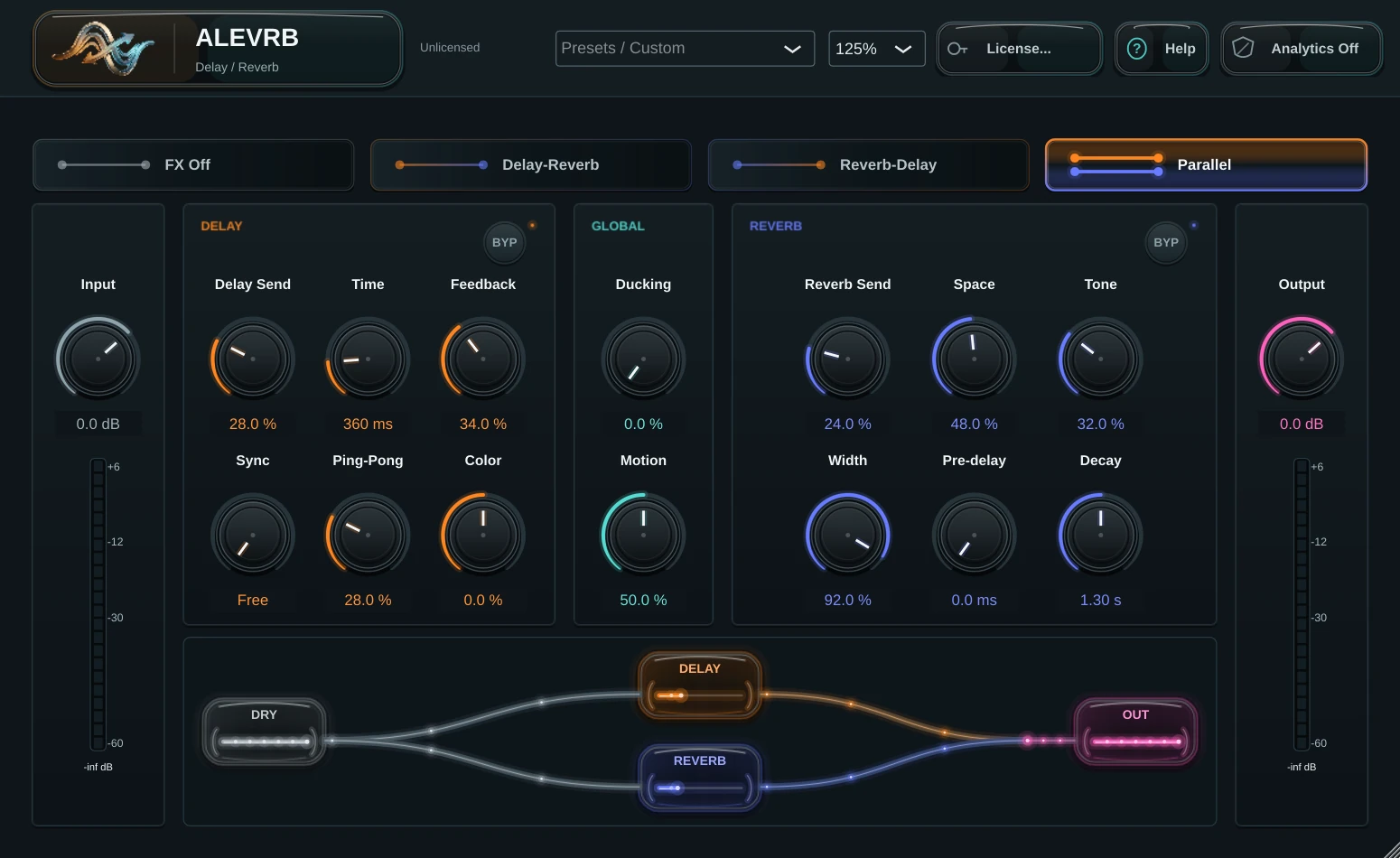
ALEVRB is a delay and a reverb in one plugin. You pick the order they run in, and the display at the bottom of the window shows where the signal goes.
The builds aren't code-signed yet. Here's how to open them the first time.
Hear it
These are the same drum loop with the same settings. The only thing that changes is the routing. All four files are matched to the same loudness, so none of them sounds better just because it's louder. Headphones help.
The dry loop with no effects, for reference.
The delay and the reverb each get the dry signal and are mixed at the output. The echoes stay distinct.
The echoes go into the reverb, so they blur into the room.
The reverb comes first, and the delay repeats the reverb tail.
Watch it
A 25-second screen capture of the plugin switching routings while audio plays.
Inside the plugin
The four routings are FX Off, Parallel, Delay > Reverb, and Reverb > Delay. Each one is a single button at the top of the window. The display at the bottom draws the current signal path. If you bypass one of the effects, the display hides it and shows the signal going around it.
The display follows the live signal path, including bypasses, so you can see why a change sounds the way it does.
Send, time in milliseconds or synced to the host tempo, feedback, ping-pong, and color.
Send, space, decay, tone, width, and pre-delay.
Ducking turns the wet signal down while the input is playing. Motion adds modulation to both the delay and the reverb.
A BYP button on each effect, so you can set up one at a time without losing your send levels.
Input and output gain with meters, six factory presets, window scaling from 80% to 125%, built-in offline help, and an illustrated PDF guide. Optional anonymous usage stats are off by default. Privacy details.
Why the order changes the sound, and when to use each one.
How a split path keeps echoes distinct while both effects still play.
Keeping the dry signal forward while the tails still bloom.
The console can't load VST3 plugins itself. Use the WING as a USB audio interface, run ALEVRB in a host on your computer (Reaper, Gig Performer, LiveProfessor, and so on), and send the audio back to the WING.
The Plugin Guy reviewed ALEVRB independently. There's a video and a written review.
Buy ALEVRB
$10Once. Not a subscription.
The current version is 1.2.1. The download includes the illustrated PDF guide and builds for every supported platform.
The builds aren't code-signed or notarized yet. The releases page has first-launch steps and SHA-256 checksums.
About
ToolingDev is a one-person project. ALEVRB is the first thing I've released. I made it because I wanted to try delay and reverb in different orders without setting up separate plugins and sends each time.
The releases page has SHA-256 checksums for the downloads and the changelog for every version.